
Controlling redirects is one of the most significant but neglected areas of maintaining the WordPress sites. You need to know how to Redirect a Page or Post in WordPress whether you are reorganizing your site, just updating old content, or moving to a new domain in this case, you will save your SEO rankings, still have valuable back links, and always have visitors being directed to the correct page. In the absence of the correct redirects, either deleted or moved pages will display frustrating 404 errors, which will send users away and indicate poor quality of the site to the search engines.
We are going to go through all the details of How to Redirect a Page or Post in WordPress, which includes the knowledge of the various types of redirects, and the different ways to use redirects through use of plugins or writing of code. Be it the first time using it or the hundredth time, you will find practical options that suit your level of technical comfort and are able to keep the web site user friendly and healthy.
What is a Redirect & Why Use One in WordPress?
Definition
A redirect is an automatic command that redirects the visitors and search engines who visit a particular URL to a different URL devoid of human intervention. Whenever one clicks on an old link or even key-boards a past URL on his or her browser, the redirect automatically directs one to the new destination. Imagine that it is a mail forwarding – at the time you change houses you have to forward mail so that when someone writes to you, the mail can reach you even though you have moved.
The redirects in WordPress also operate the same way such that on moving to other pages, changing URLs or having them deleted, customers and search engine crawlers are still directed to the appropriate, live content. This is done automatically within milliseconds such that the transition is seamless and does not impact the users to affect your site authority, link equity, and search rankings.
The reason why it is necessary to understand How to Redirect a Page or Post in WordPress:
- Prevent Broken Links (404 Errors): Redirects ensure that users don’t land on pages that no longer exist, improving user experience.
- Preserve SEO Value: A 301 redirect transfers most of the old page’s search engine ranking and backlinks to the new page.
- Maintain Traffic & Conversions: Redirecting old URLs helps retain visitors who might otherwise leave your Site.
- Reorganize Your Website: If you change your Site structure, merge posts, or rename pages, redirects keep everything connected.
- Temporary Promotions or Campaigns: Use 302 redirects to send visitors to temporary landing pages without affecting your main URLs’ SEO.
Common Types
- 301 Redirect (Permanent): It shows the permanent change of URL; transfers 90-99% of the linking power to the new page; the best choice that fits best in SEO.
- 302 Redirect (Temporary): Hurrah, gives their temporary relocation: It does not give their full link authority; lay it effectively for temporary modifications.
- 307 Redirect (Temporary): The same, however, preserves HTTP method; this is used with not-obsolete use of HTTP/1.1.
- Meta Refresh: This is a redirect control on the client side; this means it is done on the browser and cannot be used to do optimisation.
- HTML to HTTPS: Enforces secure browsing; necessary on all the current websites and search levels.
Why for WordPress
- Keep SEO Ranking: Use your hard-to-earn searches in case of update or relocation.
- Preserve Link Equity: Add to your backlink value flowing be it to 404 errors.
- Enhance User Relationship: Help remove annoying dead-end pages which raise bounce rates.
- Do not have more than one page with similar content: Combine pages with similar content to avoid losing SEO that is associated with duplicate content.
- Site Migration: Support seamlessly moves to new domains or URLs without any loss of traffic.
- Content Reorganization:Modify the structure of the site and its navigation and do not lose the ability to reach the links to the old pages.
Redirecting a Page or Post in WordPress Without a Plugin
A. Using WordPress PHP Function
WordPress also has inbuilt PHP features of making redirects inside your theme files. Relocating a Page or Post in WordPress without any extra plugins is offered by the wp redirect function. To add the redirecting codes you may use the template redirect action hook by adding redirecting codes into your functions.php file. The approach provides you with finer grained control over specific redirects depending on the conditions that you specify.
Here are the Key Steps:
Backup your site
- Always backup your functions.php file before editing.
Edit functions.php
- Go to Appearance → Theme File Editor → functions.php.
Add the Redirect Code
function custom_redirect_page() {
if (is_page(‘old-page-slug’)) { // Replace with your old page slug
wp_redirect(‘https://yourwebsite.com/new-page-slug’, 301); // 301 Permanent Redirect
exit;
}
}
Save changes
- Update the file and test by visiting the old URL. It should redirect to the new page.
Optional: Redirect Posts
- Replace is_page(‘old-page-slug’) with is_single(‘old-post-slug’) for posts.
B. Using Apache .htaccess / Nginx Server Rules
The fastest way of redirecting is by using server analysis through .htaccess (Apache) or configuration files (Nginx) since these are what happen first intellectually before WordPress loads. In the case of Apache servers, you may simply include redirect rules with the.htaccess file in your WordPress root directory. This is a plain case of a 301 redirect that will appear to be the following: Redirect 301 slash old-page to yoursite/new-page. This approach is extremely productive and does not depend on WordPress, which is why it can be successfully used to deal with a large number of redirects.
A) Apache (.htaccess) Redirect
Backup .htaccess file
- Located in your WordPress root directory.
Edit .htaccess
- Add the following at the top (before WordPress rules):
Redirect 301 /old-page-slug/ https://yourwebsite.com/new-page-slug/
Save & Test
- Visit the old URL; it should redirect to the new page.
Redirect 301 /old-post-slug/ https://yourwebsite.com/new-post-slug/
B) Nginx Redirect
Edit Nginx Configuration File
Usually located at /etc/nginx/sites-available/your-site.
Add Redirect Rule
rewrite ^/old-page-slug/?$ https://yourwebsite.com/new-page-slug/ permanent;
Save & Reload Nginx
sudo nginx -t # Test configuration
sudo systemctl reload nginx
Optional: Redirect Posts
rewrite ^/old-post-slug/?$ https://yourwebsite.com/new-post-slug/ permanent;
Redirecting a Page or Post in WordPress With a Plugin
Step 1: Install and Activate Rank Math
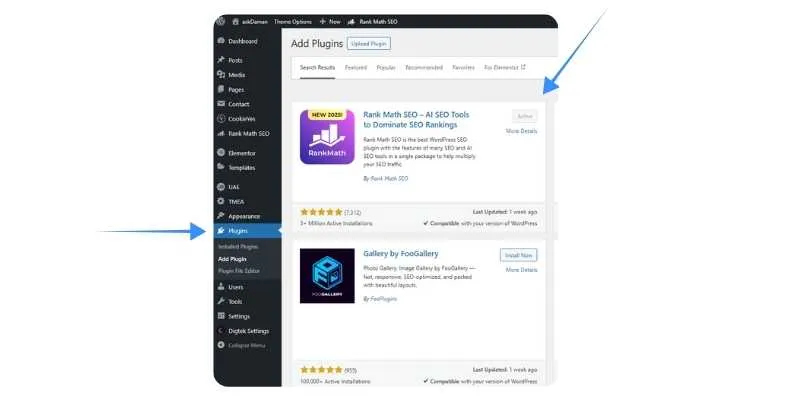
- Go to WordPress Dashboard → Plugins → Add New.
- Search for Rank Math.
- Click Install Now and then Activate.
- Complete the Rank Math setup wizard if you haven’t already.
Step 2: Access the Redirection Module
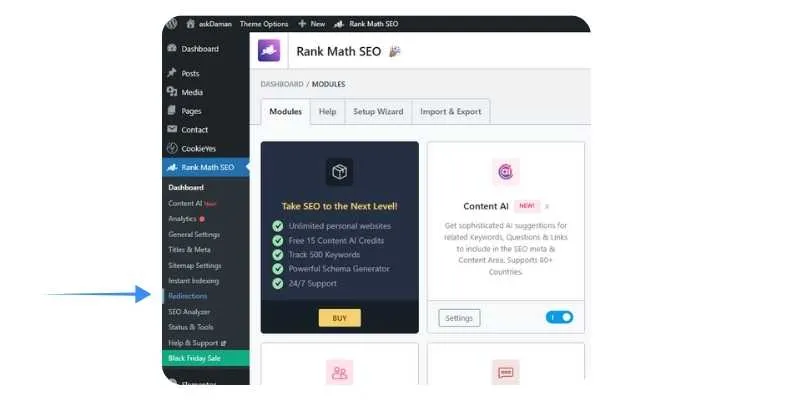
- Go to Rank Math → Redirections in your WordPress dashboard.
- If the module isn’t active, you’ll be prompted to enable the Redirections module.
- First enable it to start managing redirects.
Step 3: Add a New Redirect
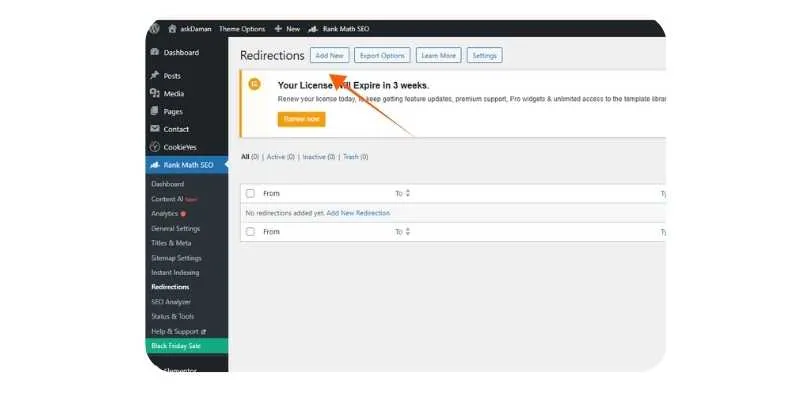
- Click Add New.
- In the Source URL field, enter the URL of the old page or post you want to redirect (e.g., /old-page-slug).
- In the Destination URL field, enter the URL of the new page or post (e.g., https://yourwebsite.com/new-page-slug).
Step 4: Choose the Redirect Type
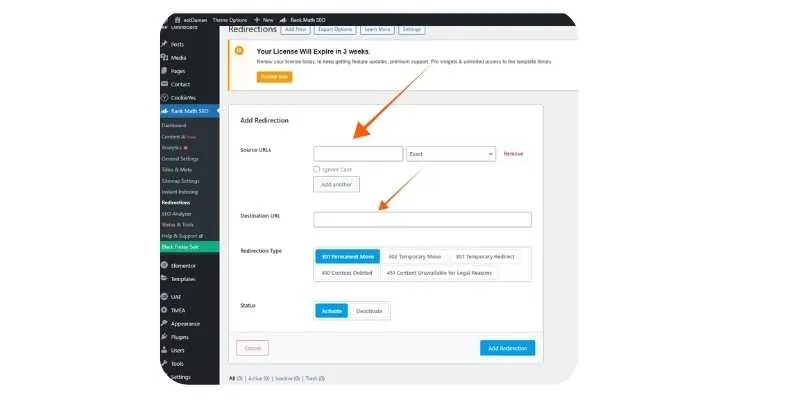
- Select 301 Permanent for SEO-friendly permanent redirects.
- Other types (302, 307, etc.) can be used for temporary redirects if needed.
Step 5: Save the Redirect
- Click Add Redirection.
- The redirect is now active.
Step 6: Test the Redirect
- Open an incognito window.
- Visit the old URL.
- Confirm that it automatically redirects to the new page or post.
SEO Best Practices & Things to Avoid
- Permanent moves should always be transpired using 301 redirects in order to transfer maximum link equity and authority.
- Second, do not use redirect chains i.e. the same URL redirects to another redirection chain.
- Should not reallocate the multi-purpose content towards the inapplicable data; should retain the relevancy of topics in both new and old materials.
- Immediately after the implementation verify using the various browsers and the various devices all redirects.
- Track redirect speed; Redirect is quickest followed by PHP and lastly the meta refresh.
- Fix internal links as opposed to using redirects as the absolute solution always bk-up solution.
- Install HTTPS redirects to resort to secure connections and unite the versions HTTP/HTTPS.
- They should not use 302 redirects in permanent modification because the redirect will not transfer all link equity to new pages.
- Redirecting to the homepage as a catch-all solution is not a good idea, instead, seek out the most relevant alternative page.
- Period Erase the redundant redirects and purge the redirect database.
- Log all redirects on spreadsheet so this can be used in future reference and site migration.
- Avoid the use of meta refresh redirects which are less search engine friendly and slower compared to server/PHP redirects.
Conclusion
How to Redirect a Page or Post in WordPress is one of the most crucial skills that a person, who runs a WordPress-based website, should have by 2025. It can be as easy as installing a few plugins such as Rank Match and Plugin Redirection, or it can be as powerful as the server level redirects that use.htaccess which is handled by .htaccess redirects but either way the point is to do it in the right way so that you keep your SEO worth and offer a smooth user experience.
Your safety nets in case of restructuring content, the changing of URLs, or moving your site are the redirects, which make sure that years of link building and search engine strength does not go away in one night. Always remember to use 301 redirects in permanent moves, do not use redirect chains, and monitor your redirects on a regular basis to have a healthy site. Through the techniques and best practices discussed in this guide, you will be sure to cope with the situation of any redirect your WordPress site will face.
FAQs
What is the difference between 301 and 302 redirects between WordPress?
A 301 is permanent and transfers most of the SEO value on the new page whereas a 302 is temporary and conveys information to the search engine that the previous page will be restored, which preserves less link equity.
Would it be possible to use redirections to redirect a page on the site without the use of a plugin?
No, that requires an edit of .htaccess file pages, the use of PHP in your theme functions.php, or server configuration scripts, such as Nginx rules.
Does the use of redirects slow WordPress sites?
Redirects at server-level (.htaccess) are very quick and minimum overhead is added whereas redirects with the help of a plugin could have slight effects on performance when you are about to have hundreds of redirects.
I would need to redirect my whole website on WordPress to a different domain, how do I do that?
Note the 301 redirect in you.htaccess, write the following code: RewriteRule (.*) https://newdomain.com/$1 [R=301,L] and redirect all the pages to what is in the new domain with preservation of order of URLs.
Do I have to have redirects permanently?
In pages with a lot of backlink that appear vital, have redirects permanently. On minor pages, it is normally possible to remove redirects after a period of 6-12 months when the search engines have completed their re-indexing.