
Suppose that you went into a big library. The shelves are covered with thousands of books. You are wanting a book about Space Travel.
How would you find it?
You see the huge, striking titles on the covers. A book without a title will not be chosen. In case the title is small and is not visible. When the title is Book #459, you will not have any idea of what it is all about.
Websites work the same way. About the time you open a webpage that H1 tag is the big and bold title. It makes Google and any other search engine know what is on the page. It is the main headline.
Minor details are very important in SEO. One of the details that are the most crucial is the H1 tag.
This tutorial will involve all the details of the optimal definition of H1 tags in SEO. We shall make it simple, clear and easy to understand. Afterwards, you will have produced H1 tags that will enable your site to climb up the search rankings in 2026.
What Are H1 Tags:
An H1 tag is the primary heading of a webpage, defined in HTML as <h1>, that indicates the main topic of the page to both users and search engines. In SEO, the H1 tag helps:
- Structure content in a logical hierarchy
- Search engines understand the page’s main focus
- Users quickly identify what the page is about
Why H1 Tags Still Matter in Modern SEO
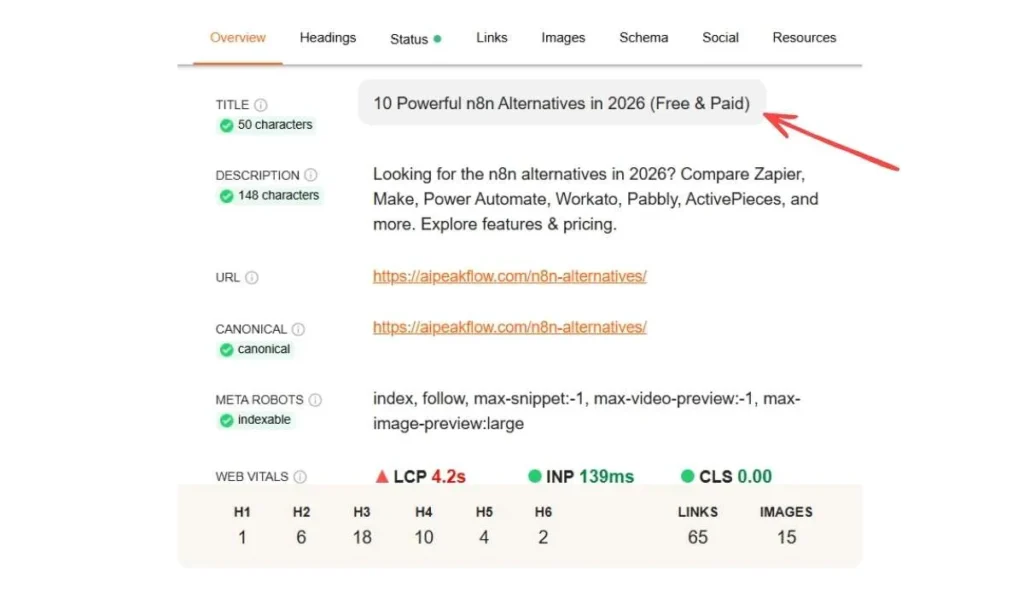
You may think, Google is now so smart. It does not even require a plain headline to get an idea of what I am doing on a page, does it?
The answer is yes.
The H1 tag is essential in the organization of the web, even in 2026, with advanced AI. These are the three key reasons as to why they are more important than ever.
1. It Helps Google to Understand Your Page through its Spiders
Google software is known as spiders or crawlers that read websites. They do not read pictures of loveliness.
When a spider crawler comes to your page it seeks hints. It desires to know what you are talking about principally, in order that it may send your page to the proper big library.
The most prominent indicator in the page is the H1 tag.
- No H1: The spider will have to read all the words to make a guess on the topic. It might be wrong.
- With H1: The spider sees H1. Chocolate Cake Recipe. I am sure this is a page about cake.
2. It enhances User-Experience (UX)
SEO is not just about robots. It is about people. When you click on Google, you are anticipating having a page that tells you something about what the link states.
When one of the links mentions the Best Running Shoes, you will assume that it is a page on running shoes. H1 tag ascertains that expectation. Suppose the H1 is not Welcome to our Homepage, but Welcome to Best Running Shoes, then you are confused.
You may believe that you have made a wrong choice by clicking. Baffled visitors press the Back button.
H1 Tag vs Title Tag – What’s the Difference?
The question that many beginners ask is whether the Title Tag and the H1 Tag are identical or not. They are similar yet they reside in different locations and are employed differently.
- “Wait, am I not the Title Tag / the H1 Tag?
They are alike, except that they reside in various locations and work at various occupations. Bear in mind your webpage is more like a physical store. Let’s say you own a pizza shop.
1. Title Tag (The Outdoor Sign).
The Title Tag is the one that is suspended outside the shop in the street.
- Where you find it: You find it on a Google search (it is the blue link you have clicked on). You also find it in the tab of the top of your browser.
- The job: The task of the job is to make people click and enter the shop. It has to be short and easy to remember so that it can fit on the search screen.
- Code: It resides in the section of the code of your web site in the head.
2. The H1 Tag (The Indoor Banner)
The H1 Tag is the large banner in the wall of the shop.
- Where you see it: It takes to see it when you have already clicked and went to the page. It is the headline of the article itself.
- The work: It is a work to inform people that you are here! Start reading.” It confirms the topic.
- Code: It is found in the <body> of the code of your site.
Simple Rule:
- Title Tag: Click me! Google Search Results.
- H1 Tag: To the human reader on the page H1: Read me!.
There are several questions regarding the number of h1 tags to use on any page. It is one of the issues that brings much controversy between SEO professionals.
The technical mistake in the old days of the internet was to have more than a single H1 tag. Nowadays, using modern HTML5 you can use more than one technically.
But should you? No.
One H1 tag on a page is the best way to achieve the best SEO. Imagine a news page of the newspaper. It contains a single huge headline on the top: MAN WALKS ON MOON.
The most significant news is presented in this heading. With five headlines in the same giant size, all spanning the entire page, it would be all over with the newspaper. You would have no idea where to begin.
Google prefers one H1. It assists the algorithm in making the decision of what the main subject is.
Users prefer one H1. It appears more professional, clean and readable.
What happens if I use two H1s?
In case you have many H1s, you are thinning the potency of your page. Suppose you are having a page on apples.
H1: “Red Apples are Great”
H1: “Green Apples are Sour”
Google might get confused. Is this paper primarily about Red Apples? Or Green Apples? Which one should I rank?”
The Golden Rule: Every page is supposed to have only one H1 that will define the general subject matter. The subheadings and details should be indicated using H2, H3 and H4.
SEO H1 Tag Best Practices 2026
At this point, we will examine the exact rules to be abided by. It is currently the SEO H1 Tag Best Practices that are effective in the year 2026.
1. Use one clear and primary key-word.
Google would be happy to know what you are all about in your H1 tag. Insert here your major keyword. The first key word is the key balance that individuals use in Google in order to locate your page.
Example: Suppose you are writing an essay on the topic of Dog Training Tips.
- Bad H1: “My Ideas on Pets” (Too general). Google does not have a clue that it is training.
- Bad H1: Nothing to it.
- Good H1: “Top 10 Dog Training Tips to Begin With: How to Teach a Dog.
Why does this work?
Google will first look at the H1 when page is scanned. When it reads Dog Training Tips in the title, then your page has a point of relevance. It reads, “Well, this is surely a dog training page.
Pro tip: It is desirable to place the keyword at the start of the H1 tag as far as possible. It assists in attracting the attention of the user.
2. Keep It Under 60–70 Characters
Eventually, you do not want your H1 tag in the form of a paragraph. It is a headline. Long H1 tags are not easy to read and appear untidy on phones. When your H1 is too long, it will make the content move down the page, forcing the users to scroll down just to begin reading.
Attempt to have your H1 brief and to the point. Target: 60 to 70 characters (letters and spaces).
- Too long: The Ultimate Guide to How You Can Repair Your Bathtub Leak in the Bathroom Yourself Without Hiring a Plumber to Day One because Plumbers are too Expensive.
- Perfect: How to Fix a Leaky Bathroom Sink (DIY Guide).
3. Make It User-Focused, not Just Keyword-Focused.
Several years ago, individuals attempted to defraud Google. They composed robotic H1 tags that were filled with keywords.
- Old Robotic Way: Plumber New York Best Plumber Cheap Toilet Plumber Fix.
This looks like spam. But real human beings despise this. It has a bad appearance on your website.
In 2026, Google will be intelligent enough to comprehend natural language. You must write to human beings first. Your H1 needs to be exciting. It must pique the user to read on the remaining part of the page.
- Robotic: SEO Tips for Beginners Guide 2026 Ranking.
- Human: 10 Simple SEO Tips for Beginners (2026 Guide).
4. Ensure H1 Matches Search Intent
Search Intent is an SEO jargon. It merely implies: What do the user desire at the moment?
A user is often interested in three things:
- To Learn (Informational): A Tie Tying.
- To Buy (Transactional): “Buy silk tie.
- To Locate a certain location (Navigational): “Amazon ties.
Your H1 must match this intent.
Example 1: Intent to Learn
When a user types in a query such as how to bake a cake, he/she is seeking a recipe.
- Bad H1: Buy Cake Pans Here (They do not want to buy but they want to learn)
- Good H1: “ Step-by-Step Chocolate Cake Recipe( Matches intent )
Example 2: Intent to Buy
When a customer types in Buy iphone 16, he/she desires a store.
- Bad H1: History of the Apple iphone (Boring). They want to shop!)
- Shop the New iPhone 16 – Best Prices (Matches intent) is presented in the form of a good H1.
When your H1 is not what your user desires, s/he will walk away. Google is observant of individuals who leave immediately and demotes their ranking.
5. Align H1 with Title Tag (But Don’t Duplicate Exactly)
Your H1 tag and your Title tag (Google link) should be acquaintances. They are to repeat the same tale. They do not, however, necessarily have to be identical twins.
It is even preferable that they should be a bit different. Why? After approximately 60 characters, Google terminates it. So, it needs to be very short. The H1 Tag has more room. You may extend it, make it descriptive, and make it more conversational.
Example:
- Title Tag (Short name Google): Best SEO Tools 2026 Top 10 Reviews.
- H1 Tag (Long Tag): The 10 Best SEO Tools Every Marketer Needs in 2026.
Do you feel that the H1 is more natural? It includes such words as Every Marketer Needs. It is more like a natural sentence.
The Safety Check: To be on the safe side, it is all right to make them the same. It won’t hurt you. However, adding a bit of description to H1 is normally more advantageous to the reader.
6. Maintain Proper Heading Hierarchy
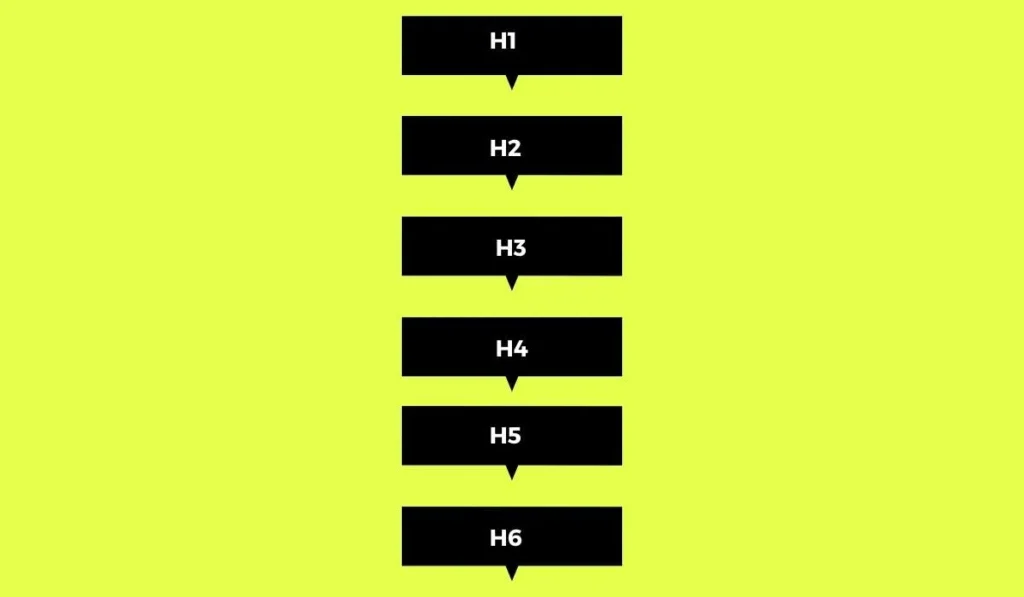
A well-written book or school outline designates a good webpage. Google also analyzes your “Heading Hierarchy. This is the sequence in which you are written.
H1: The Book Title (Maintain Subject)
- Chapter Titles (Major Sections): Chapter 4 contains the majority of the research information about the topic and is therefore regarded as the primary part of the research paper.
- Chapter Titles (Major Sections): Chapter 4 includes most of the research material on the subject and can thus be considered as the main body of the research paper.
Common Mistake:
Never skip levels. Do not leave the font size of an H4 and go to an H4.
- Wrong: H1 → H4 → H2
- Right: H1 → H2 → H3
Common H1 Tag Mistakes to Avoid
Even clever website owners and professional web developers. The following are the pitfalls that should be avoided.
1. Missing H1 Tags
Weirdly enough, there are pages that do not have an H1 tag. This normally occurs on Home pages or on the Contact pages.
- Why it is bad: You are depriving yourself of the most important opportunity to make Google know what you do.
- Fix: Each of the pages must have an H1. Even the Contact page must have an H1, which is Contact Us.
2. Duplicate H1 Tags on One Page
The reason is that, given two or more H1 tags on a single page, it would occur. For example, your logo on the site is enclosed in an H1 tag (acceptable error in code), and your article title is also enclosed in an H1 tag.
- Why is it bad? It will perplex Google. “Is the page about the Logo? Or the article?”
- Fix: You might request your web programmer to ensure you do not have an H1 logo. There should be an H1 only for the main text headline.
3. Keyword Stuffing
It occurs when you add a lot of keywords to a tag in an attempt to rank higher.
- Bad: Cheap Laptops, Buy Laptops, Best Laptops, Online Notebooks PC.
- The reason why it is bad: Google refers to it as over-optimization. It looks like spam. Google can punish your website.
- Fix: Write natural sentences. The location of the best cheap laptops online.
4. Hidden H1 Tags
There are also those individuals who use CSS to conceal the H1 tag to ensure clients do not notice it, yet Google can. The reason why they do this is to place keywords without altering their design.
- Why it is bad: This is what Google refers to as cloaking. It violates Google’s policies and will cause your site to be dropped by Google.
- Fix: Never hide text. When it is on Google, put it there on users.
5. Using an Image as H1
A picture of text as the headline is used by the designers in some cases.
- Why it is bad: Google is not able to read the text in an image easily. Images without special descriptions cannot also be read by the screen readers.
- Fix: You always want to use real text in your H1. You can change the font and color with CSS styles in case you want it to appear fancy.
How to Audit and Optimize H1 Tags
Audit is merely a fancy term of checking. Do you test whether your H1 tags are good? You don’t need to be a coder. Here are three simple ways.
Tool 1: The Eyeball Test (Manual)
- Open your webpage.
- Take a glance at the largest text at the very beginning.
- Question you: Is it an apt description of the page? Is it clear?
- If yes, you’re probably fine.
Tool 2: The free and site Inspect Tool (Free and Accurate)
This will cause you to appear like a professional hacker yet it is quite simple.
- Launch Google Chrome webpage.
- Click with the right-hand button on the large headline.
- Go to a menu and take choice of inspect or inspect element.
- A side window with a code will be opened.
- The tag with the name h1 appears in the result segment.
- You can see that you are good when you see
- In case you find it you must correct it in case you find h2.
Tool 3: The SEO Browser Extensions
You can get free tools that can perform the job on your behalf.
- SEO Minion: This is a Chrome extension that is free. A single click and it underlines all the headers (H1, H2, H3) on the page.
- Detailed SEO Extension: This is also a free tool that provides you with an overview of your heading structure in a basic list.
These surveys will immediately inform you whether you have:
- Missing H1s.
- Multiple H1s.
- H1s that are too long.
Do H1 Tags Directly Impact Rankings?
This is the major question that all website owners pose. Will I be number one on Google if I fix my H1s?
The sincere response must have a touch of class. H1 tags are not considered to be a key ranking aspect by Google. It is to say that the change of an H1 will not automatically make a bad site go to the top. It is not possible to put the cap on a bad article and call it a good one.
However;
They are very context and usability-oriented. The H1 tag is the tires on a racing car.
- Does a car go with flat tires? hardly.
- Does a new set of tires increase the engine speed? No.
But do you need good tires to win the race? Absolutely. In case Google does not know the context of your page (you have no H1), it will not rank you with the correct keywords.
Another thing that influences the user experience is H1 tags.
- Good H1: When users stick around, you know Google is listening to your site, and you get higher positioning.
- H1 = bad users (bounce) = leave your site = bad = low rankings.
The tag is a tiny fragment of the puzzle; therefore, a good H1 can work wonders. It forms the basis of a good SEO strategy.
Conclusion
H1 tags are easy to use and yet effective. And they are the title of your plot. They instruct Google bots in the process and open welcome to human readers of your content. You do not have to be a technological genius to learn them. You only have to be concerned about clarity.
In order to achieve the best SEO H1 Tag Best Practices, it is important to keep in mind that there are three golden rules: One H1 per page. Keep it focused. Include your main keyword. Tell Google what the topic is. Write for humans, not robots. Be descriptive and helpful.
By doing this, the site will be cleaner, more approachable, and will be able to be ranked.
FAQs
Can I use an image as my H1?
No. The message should always be better with SEO since it is easily read by Google. When you have to have an image, add an alt tag as an explanation.
Is it all good that my title tag and H1 are identical?
Yes, it is perfectly fine. It is common and safe. All you have to do is to ensure that they include your main keyword.
Can I change my H1 tag later?
Yes! Review your H1, in case you get a more suitable keyword or a more catchy title. It may even serve to increase your position.
How long should my H1 be?
Length should be 20-70 characters. This is easy to read and understand in mobile.